
Industrial Marking
Enicstra stocks industrial marking systems across all major technologies: continuous inkjet (CIJ) and thermal inkjet (TIJ) for non-contact product marking, fiber and CO2 laser markers for permanent direct marking, thermal-transfer label printers for case and pallet labeling, dot-peen and scribe marking for hard-stamp metal traceability, and label applicators that handle dispensed labels onto moving products.
Brands carried include Domino A-series and V-series, Videojet 1000-series and 8000-series, Markem-Imaje 9000/9400/9700 CIJ, Hitachi inkjet, Linx, Zebra ZT/ZE/110 thermal transfer label, SATO, Honeywell Datamax-O'Neil, Telesis Pinstamp, Pannier, and Trumpf VMc laser. Obsolete marking systems across categories are sourced through our supplier network. Equipment ships with a 12-month functional warranty on hardware; consumables (inks, ribbons, labels) are not warranted beyond shelf life.
For obsolete marking equipment, send the OEM part number for a quote within 1–2 business days.
Subcategories

Inkjet Printers
2 products
Industrial inkjet printers — continuous inkjet (CIJ) and thermal inkjet (TIJ) for non-contact product marking.
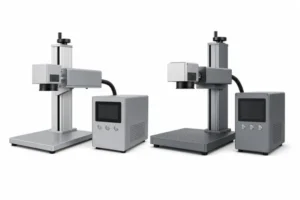
Laser Marking Equipment
2 products
Industrial laser marking systems — fiber, CO2, and UV lasers for permanent marking on metal, plastic, glass.
Industrial Marking
$329.18/ea
Available
Can't Find The Part You Need?
Send us the part number, manufacturer, quantity, and condition — we'll locate it.
Do you stock obsolete industrial marking equipment?
Yes. Discontinued Domino A-series first generations, retired Videojet 1000 codes, end-of-life Markem-Imaje, and earlier Telesis Pinstamp are sourced through our supplier network.
Inkjet vs. laser — which should I pick?
Inkjet for porous/absorbent surfaces (cardboard, eggs, lumber) and variable lot/date marking. Laser for permanent marks on metal and many plastics. Laser has higher equipment cost but lower per-mark cost long-term.
Are consumables (inks, ribbons) included?
No — consumables are sold separately and are application-specific. We can supply OEM consumables matched to the printer; some third-party consumables exist but may affect warranty status with the OEM.
Does the laser marker need a safety enclosure?
Class 4 lasers (industrial fiber and CO2 markers) require interlocked enclosures or area lockout per ANSI Z136. Class 2 or 3R desktop systems have lower requirements. Match the original safety configuration.
What is the warranty?
12-month functional warranty on hardware. Consumables (inks, ribbons, labels) carry their own shelf-life ratings. Damage from improper consumables, missed maintenance, or operating outside rated environment is not covered.
Can the printer communicate with my PLC?
Most industrial marking printers offer Ethernet/IP, Profinet, Modbus TCP, or serial integration. Variable data (lot codes, serials, dates) is typically pushed from the PLC or a print-controller PC. Specify the communication interface needed.
